Built Inside PowerSchool — No Extra Logins. No New Apps.

The PowerSchool Digital Hall Pass Built for Real School Safety

Replace paper hall passes with a fully native PowerSchool system. Real-time student movement tracking, one-click pass creation, overdue alerts, and hallway analytics — all inside PowerSchool.
Hero Image - Digital Hall Pass

What is the PureData Digital Hall Pass?

A digital hall pass that runs inside PowerSchool SIS. Students request passes in the PowerSchool student portal, teachers approve in one click, and administrators see every student out of class on a live dashboard. It’s $149 per school per month for schools under 1,000 students, and it’s installed in 24–48 hours.

Trusted By Over 1000 + Schools and Districts Nationwide

Legal Prep Charter Academy logo
Perspectives Charter Schools logo
Divine Child High School logo
Country Club Hills School District 160 logo
Thea Bowman Leadership Academy logo
ACE Charter Schools logo
Betty Shabazz International Charter School
Gestalt Community Schools logo
Posen-Robbins School District 143½ logo
Instituto Health Sciences Career Academy logo
Lumen Christi Catholic School logo
Phalen Leadership Academies logo
Springfield School District logo

Paper Hall Passes Are a Safety Problem, Not Just an Inconvenience

Most K-12 schools still use paper slips to manage student movement. That creates real safety gaps, accountability failures, and daily frustration for teachers and administrators.
Paper Passes Get Lost, Forged, or Ignored
A handwritten pass offers zero accountability. Students lose them, write their own, or simply walk the halls without one — and no one knows until it’s too late.
No Real-Time Visibility Into Who's in the Hall

If an emergency happens, can you instantly account for every student not in a classroom? With paper passes, the honest answer is no. With the Digital Hall Pass, Emergency Lockdown freezes every active pass in one step and shows exactly who is out.

Teachers Have No Way to Know When Students Are Overdue
A student leaves for the bathroom at 10:05 AM. It’s now 10:25 AM. Without an alert system, the teacher is still teaching, completely unaware something might be wrong.
Disconnected Student Groups End Up in the Hall Together
When two students with a known conflict both have paper passes at the same time, there’s no system to catch it. The result? Preventable hallway incidents that escalate quickly.
No Data to Identify Patterns or Chronic Hallway Abusers
Which students request 15 passes a week? Which period has the most unaccounted movement? Without digital records, you’re making discipline decisions based on gut feel, not data.
Third-Party Hall Pass Apps Add Work, Not Reduce It
Standalone hall pass apps require separate logins, a new system to maintain, and a data sync with PowerSchool that’s always slightly out of date. Teachers adopt them reluctantly, then abandon them.
PowerSchool
puredata vector 1

One Digital Hall Pass System. Fully Native to PowerSchool. Live in 24–48 Hours.

PureData’s PowerSchool Digital Hall Pass replaces paper slips with a real-time hallway tracking system. Students request passes through their PowerSchool portal. Teachers approve in one click. Administrators see every student movement in real time from their PowerSchool.

Every Tool Your School Needs to Control Student Movement

Eight powerful modules. One seamless PowerSchool experience. Built around how teachers and administrators actually work.
PowerSchool
puredata vector 1

From Pass Request to Safe Return, Fully Automated

A four-step workflow that fits naturally into your school day without changing how teachers teach.

A Student Requests a Pass Through PowerSchool

Instead of raising a hand and interrupting the lesson, the student submits a digital pass request through their PowerSchool student portal. They select a destination and reason. The request is sent directly to the teacher’s portal in real time, no disruption to the class.

The Teacher Approves in One Click, Gets Alerted if the Student Is Overdue

The moment a student submits a request, the teacher receives a pop-up notification inside the PowerSchool teacher portal — complete with sound and color customization. One click to approve, one click to deny. The system then starts a timer automatically, and fires an alert if the student doesn’t return within the configured time limit.

Administrators See Every Student in the Hall Live, Right Now

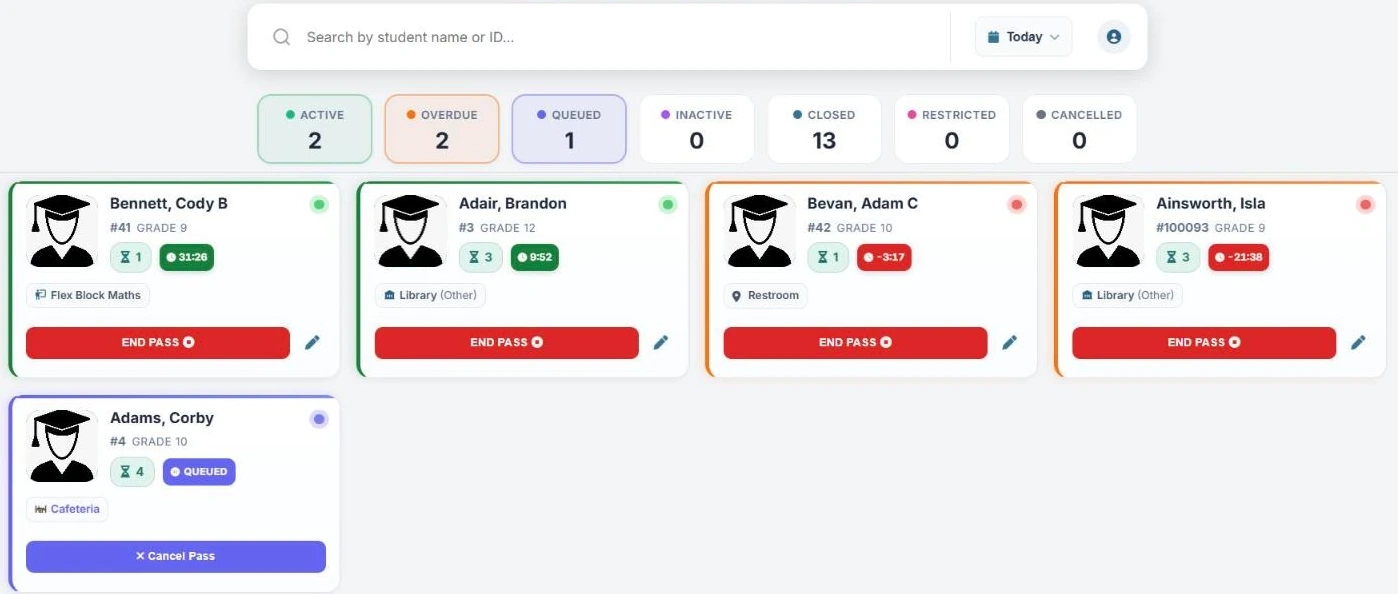
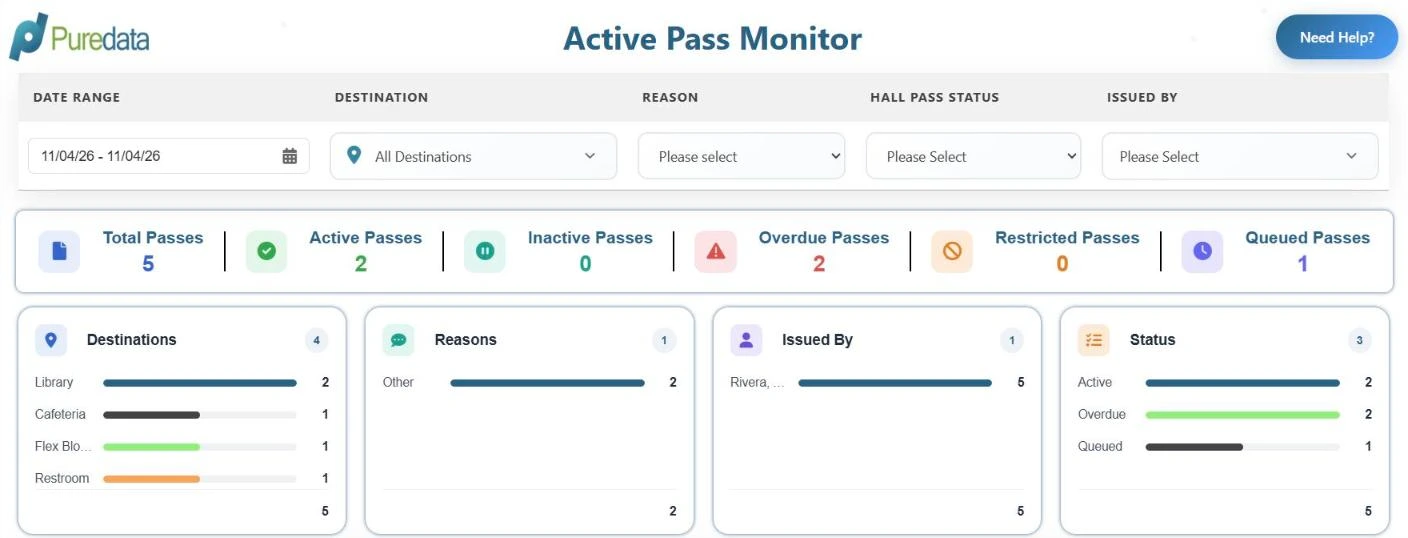
While passes are active, administrators see a real-time hallway dashboard. Active, overdue and queued passes, destinations and student names are all visible at a glance. Restricted student groups are handled for you: a conflicting pass waits in the queue until the first student is back.

Every Pass Is Logged Analytics Reveal Patterns Leadership Can Act On

When a student returns, the teacher closes the pass with one click. The full movement record — issue time, return time, duration, destination, teacher, and any overdue flag — is permanently stored in PowerSchool. Over time, this data reveals the patterns that matter: which students leave class most often, which destinations are busiest, and which passes run overdue.

In an Emergency, Lock Down Every Pass in One Step

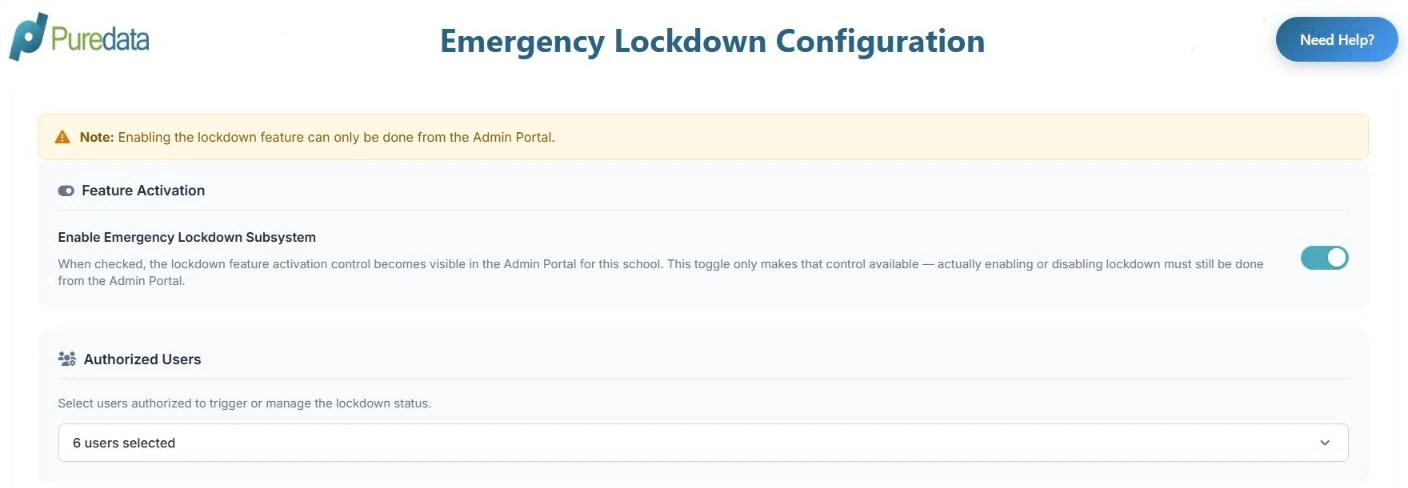
When something happens, you need to know exactly who is out of class. Authorized staff turn on Emergency Lockdown from the PowerSchool admin portal, and every active pass is frozen in place. You get an immediate list of each student outside a classroom and where they went.

Why Schools Choose PureData Over Standalone Hall Pass Apps

There are other digital hall pass tools. Here’s why schools that already run PowerSchool choose the native plugin every time.
Zero Third-Party Risk
Built Inside PowerSchool, Not a Separate App

Standalone apps like E-Hallpass and Securly run on their own platforms, with separate logins, roster syncs and their own copy of your student data. PureData’s Digital Hall Pass is built inside your existing PowerSchool SIS. Passes, rules, reports and the full pass history live in PowerSchool, and staff use the portals they already have. That means fewer systems for IT to review and nothing new for teachers to learn.

Uses Your Existing PowerSchool Data
Uses Your Existing PowerSchool Data — No Syncing Required
Because it’s native to PowerSchool, the Digital Hall Pass automatically uses your real student names, class schedules, sections, and teacher rosters. No import, no sync, no “why is this student showing up in the wrong class?” errors. It just works — with your live data.
No New Logins for Teachers, Students, or Admins
Standalone hall pass apps require every teacher, student, and administrator to create and remember yet another login. PureData’s Digital Hall Pass is accessed through PowerSchool portals they already use every day. Adoption is immediate because there’s nothing new to learn.
Live in 15 Minutes
Live in 24–48 Hours — Not Weeks of Implementation
Enterprise hall pass systems often require weeks of professional services, staff training, and a phased rollout. PureData’s plugin is installed directly in your PowerSchool instance by our team within 24–48 hours, followed by a single afternoon of staff training.
Behavior Plugin Integration
Works Alongside the Behavior Management Plugin

Pair the Digital Hall Pass with our Behavior Management Plugin, available today. Both run inside PowerSchool, so deans and counselors can review pass history and behavior logs in the same system. Coming soon: automatic flags for students with an open referral when they request a pass.

PowerSchool Expert Support
PowerSchool Expert Support — Not a Generic Help Desk
When you contact PureData, you reach a PowerSchool-certified expert who understands your specific environment. We offer personalized onboarding, direct support with an average response time under 4 business hours, and ongoing training for new staff — not a ticket queue and a knowledge base article.

PureData vs. Standalone Digital Hall Pass Tools

See why schools that already use PowerSchool choose the native plugin over third-party apps like E-Hallpass or Securly Pass. Comparing options? Use our digital hall pass buyer’s checklist.
Capability PureData Hall Pass Generic Hall Pass Apps. Paper Pass System
Built inside PowerSchool
Included
Not included
Not included
No separate student login required
Included
Varies by vendor
Included
Pass records stored in your SIS
Included
Requires DPA review
Depends on storage
Uses live PowerSchool student & schedule data
Included
Requires sync setup
Not included
Real-time admin hallway dashboard
Included
Included
Not included
Student-initiated pass requests
Included
Included
Not included
Overdue pass auto-alerts
Included
Included
Not included
Auto-queue for restricted student groups
Included
Varies by vendor
Varies by vendor
Emergency lockdown (freeze active passes)
Included
Varies by vendor
Varies by vendor
Pass history audit trail in PowerSchool
Included
External system only
Not included
No per-student device or app required
Included
Varies by vendor
Included
Setup time
24–48 hours
Days to weeks
N/A
Competitor features based on publicly available product information. Capabilities may vary by plan and school configuration.

Simple, Transparent & Affordable Pricing

Get a powerful PowerSchool Digital Hall Pass without the complexity of enterprise pricing.
$149 / month / school
**The pricing is for < 1000 Student / School**

Designed to give K-12 schools an affordable way to manage hallway movement, replace paper passes and manual tracking, and keep hall pass records accurate, all directly inside PowerSchool.

What Educators Say About PureData's Digital Hall Pass

Real results from real schools — in their own words.

Frequently Asked Questions

Everything your technology director, principal, and teachers will want to know.

Yes. The Digital Hall Pass is built directly within your PowerSchool SIS. Teachers, students and administrators use it through their existing PowerSchool portals, with no separate app, login or roster sync. Passes, settings, reports and pass history are stored in PowerSchool alongside your academic and attendance data. Two optional features, student pass requests from the Student Portal and email notifications, use secure cloud services managed by PureData to deliver the request or message.

Both workflows are supported. Students can request a pass through the PowerSchool Student Portal, and the teacher sees it right away to approve. Teachers can also create passes with one click, which is useful for younger students or anyone without portal access. You decide whether student requests are turned on in the Student Access settings.

Administrators set a default and maximum time for each destination. For example, restroom passes might allow 5 minutes and counselor visits 20. When a student isn’t back in time, the pass turns red on the dashboard and shows how long it’s overdue. You can also send email alerts to the current teacher, the student or other staff. No manual monitoring is required.

Yes. Administrators set up student groups with assigned destinations. If one student in the group already has an active pass to that destination, a new pass for another group member is queued instead of issued. It activates automatically when the first student returns. Teachers don’t need to know who is in which group.

Authorized staff turn on Emergency Lockdown from the admin portal. Every active pass is frozen in place, so you have a clear list of each student who is out of class at that moment and where they went. Your administrator chooses who is allowed to start a lockdown.

The Digital Hall Pass is designed to support your FERPA obligations. Pass records are stored in your PowerSchool database and follow the same access controls and data policies as the rest of your PowerSchool data. The optional Student Portal request and email notification features use secure PureData-managed services to deliver requests and messages. Our team can walk your IT or privacy staff through exactly what each feature uses.

The core difference is where the system lives. E-Hallpass and Securly Pass are external platforms that require separate student and teacher logins, a data sync with PowerSchool, and sending student movement data to third-party servers. PureData's Digital Hall Pass is built inside PowerSchool — it uses your live student and schedule data automatically, requires no extra logins, and keeps pass records in your SIS. Setup typically takes 24–48 hours, and your IT team has far less to review than with a standalone platform.

Yes, the two work side by side. The Behavior Management Plugin is available today, and both plugins run inside PowerSchool, so staff can review pass history and behavior logs in the same system. Coming soon: automatic flags for students with an open behavior referral when they request a pass.

Most schools are fully operational within 24–48 hours. PureData's implementation team installs the plugin directly in your PowerSchool environment, configures your pass types, destinations, time limits, and notification rules, and conducts a live staff training session. There is no complex data migration, no device rollout, and no extended IT project required. Your team can start issuing digital passes as soon as setup is complete.

Know Where Every Student Is. Every Minute of the Day.

Join 1,000+ schools that have replaced paper hall passes with a real-time, PowerSchool-native system that actually gets used.

Have questions? Our team is here to help.

    This site is protected by reCAPTCHA and the Google Privacy Policy and Terms of Service apply.